Why the zombie video works for Halloween
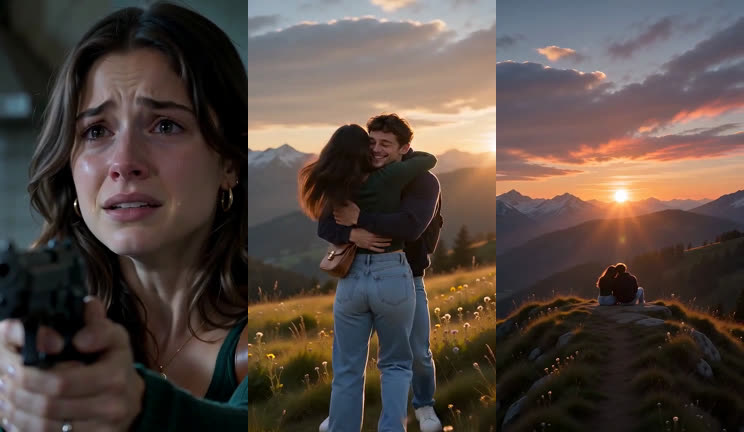
Most Halloween photo filters stop at a costume. The zombie love story is a tiny film with a twist: it opens as a horror clip and lands as a love note. It is scary enough to fit the season and sweet enough to post on a couple's account, and it uses your real faces rather than a mask.
Halloween ideas
- The couple post. You as the survivor, your partner as the zombie, the full 12-second love story. Swap roles for a second video. See zombie couple video.
- The costume tie-in. Add a direction like "both wear our Halloween costumes from the photos" so the clip matches what you wore to the party.
- The group chat. Make a zombie hug with each best friend and post them as a series.
- The pet costume. Dogs in Halloween costumes plus the hug scene. Our dog example shows what the model does with a golden retriever.
- The family card. A gentle hug with your mom or dad instead of a spooky photo card. See mom and best friend version.
One last hug (10 seconds)
A shorter Halloween option: the 10-second hug. One cold room, a lowered gun at 0:03 and a long embrace from 0:06.
Watch the beat-by-beat breakdownHalloween caption ideas
- "Happy Halloween from the end of the world."
- "Trick or treat? Neither. I'm keeping him."
- "Even zombified, still my favorite person."
- "If the dead walk this Halloween, I know who I'm saving."
- "Tag who you'd lower the gun for."
Timing: when to make it
There is no queue to book: you can generate on the day. Uploading and choosing takes about a minute and the render usually finishes within a few minutes, though busy evenings can take longer. Close the page if you like; finished videos stay in My videos.
If you are posting at a set time (a party, a midnight post), make it the afternoon before so you have time for a second version if a face does not come out right. Failed renders are refunded, but a re-render still takes a few minutes.
Settings for Halloween posts
| Where you post | Format | Length |
|---|---|---|
| TikTok, Reels, Shorts, Stories | 9:16 vertical | 10–12 seconds |
| YouTube, a party screen | 16:9 wide | 12–15 seconds |
| Instagram feed, Facebook | 1:1 square | 10–12 seconds |
Every format costs the same. $6.99 for one 12-second video, or $2.83 per video in the Crew Pack (35 videos for $99.00). The video has a soundtrack and no watermark. More detail in our how-to guide.
Photo checklist for Halloween night
- Take or pick the photos in daylight or bright indoor light; party lighting makes faces drift.
- One face per photo, looking at the camera, no sunglasses.
- If you want costumes in the clip, keep the face visible: face paint is fine, full masks are not.
- Get the other person's OK before you post them as a zombie.
After Halloween
The zombie love story is not a Halloween-only trend: people post it for anniversaries and "tag your person" days too. This page stays up after October 31, and the generator works the same all year.
Questions
Can I make a Halloween video from one photo?
Yes. A single photo of the two of you works: the person on the left becomes the survivor and the person on the right turns. Two separate photos keep faces more accurate.
How fast can I get a Halloween video?
Usually within a few minutes of pressing Generate. Busy times, such as Halloween evening, can take longer.
Is it too scary for kids to watch?
There is no gunfire, biting or blood in our prompts, but the opening is a horror scene with a gun and a zombie. Treat it as a teen-and-up clip. Photos of children are not allowed.
Can we wear our costumes in the video?
Add a direction such as "both wear the costumes from the photos". Results vary with the costume; masks that cover the face make the likeness worse.
Is there a Halloween discount?
Prices are the same all year: $6.99 for one video, down to $2.83 per video in the Crew Pack.